
By Dan Magni

In SAP S/4HANA Credit Management, you maintain a business partner’s credit limit by credit segment and monitor how much of it is used. A main segment can also hold an overall limit. If both limits are checked, a sales order can pass the subsegment limit check and still fail the main segment limit check.
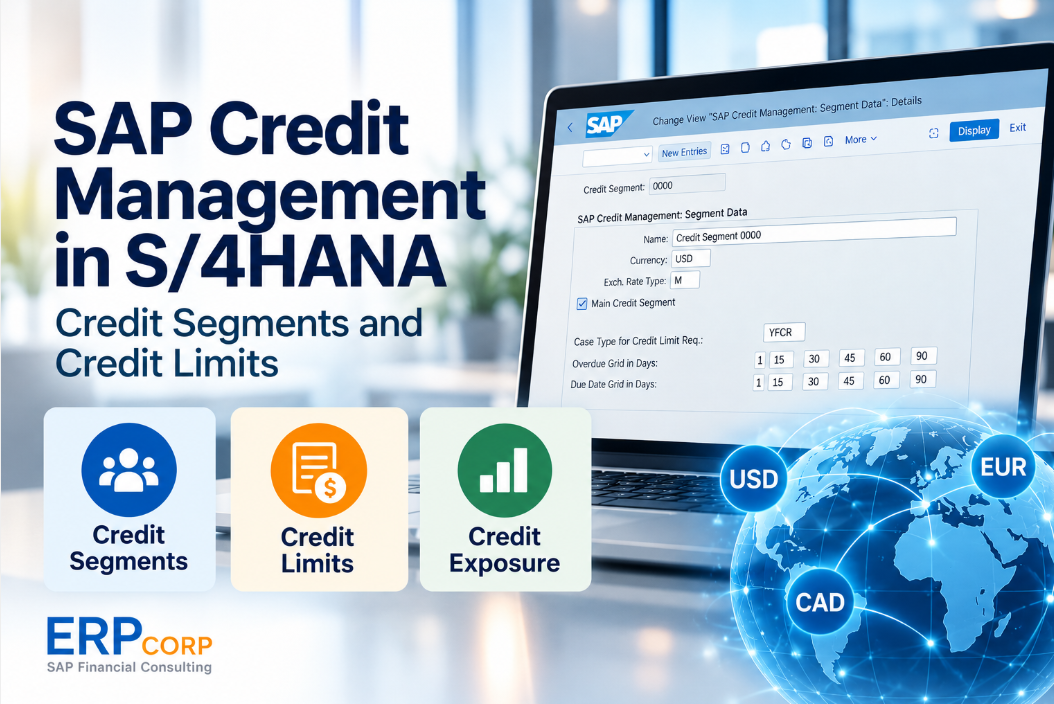
Credit Segment Definition
A credit segment is an organizational unit in SAP Credit Management used to manage a business partner's credit limit and credit exposure. A business partner can be assigned to multiple credit segments, allowing credit risk to be managed separately for different parts of the business.
The Manage Credit Accounts app provides access to business partner credit information by segment.
How Segments Are Organized
Credit segments allow companies to organize credit management according to their business requirements. One approach is to create credit segments by currency or organizational structure.
For example, a company may design separate credit segments for these currencies and, where required, configure a main segment for an overall view. The following segment numbers are illustrative:
- Segment 1100 – USD
- Segment 1200 – CAD
- Segment 1300 – EUR
Each segment has its own credit management currency. A currency-based structure is one design option; it is not a requirement to create a separate segment for every transaction currency.
Main Credit Segment and Exposure Rollup
A main credit segment can provide a central view of credit exposure and hold an overall credit limit for the business partner. Figure 1 shows the main segment settings in SAP S/4HANA. Available settings can vary by release and deployment.

Figure 1 shows the Main Credit Segment indicator along with the case type for credit limit increase requests and the due date and overdue grids. These settings support credit management reporting and the evaluation of business partner credit exposure.
Review two configuration decisions when you set up a main segment. First, choose whether subsegment liabilities contribute to main segment exposure. Then choose which limits the credit check evaluates. You can check the subsegment limit, the main segment limit, or both. See SAP’s credit limit documentation.
Exposure can be translated into the segment currency using configured exchange rates. The reporting currency and exchange rate setup therefore matter when comparing exposure across segments.
Example of a Main Segment Credit Check
Assume a business partner has a USD subsegment and a USD main segment. The subsegment contributes its exposure to the main segment, both limits are checked, and the full $20,000 order adds to exposure. Table 1 shows the projected exposure at each level.
| Credit Segment | Credit Limit | Exposure Before Order | Projected Exposure | Limit Check |
|---|---|---|---|---|
| USD Subsegment | $100,000 | $70,000 | $90,000 | Pass |
| Main Segment | $200,000 | $190,000 | $210,000 | Fail |
The order fits within the subsegment limit but exceeds the main segment limit by $10,000. If the credit check blocks the order, review the result at the main segment before requesting a change to the subsegment limit.
Manage Credit Accounts App
The SAP Fiori app Manage Credit Accounts (F4596) brings together a business partner’s credit profile and segment details. It supports reviewing credit limits, exposure, and limit utilization, and maintaining credit data at the appropriate level.
- Open the business partner’s credit profile and identify the assigned check rule.
- Open the segment used by the sales document and compare its limit, exposure, and utilization. If the design includes a main segment check, review the main segment too.
- For a blocked order, review the credit check log to see which check step failed. A check rule can also evaluate factors such as the oldest open item.
Available functions depend on your release, activated scope, and authorizations. See SAP’s documentation for Manage Credit Accounts and credit checks.
Key Takeaways
Define which subsegments contribute to main segment exposure and which limits the credit check evaluates. When an order is blocked, use the credit check log to identify the failed step before changing a limit.
Related Reading
- For the broader financial architecture and reporting context, read SAP Accounting Powered by SAP HANA: FAQs and S/4HANA Evolution.
- For the steps to release a blocked order, change a limit, or recheck a document in ECC or S/4HANA, read SAP Customer Credit Limits.
Need Help with SAP S/4HANA Credit Management?
Bring your credit segment design, business partner data, and credit reporting into line with your business requirements.
ERPCorp helps teams review SAP Finance processes, investigate configuration and integration issues, and plan practical S/4HANA improvements.
Glossary
Business Partner
The SAP master data object representing a customer, supplier, or other party. Its credit data is managed through the credit profile and assigned segments.
Credit Segment
An organizational unit for managing credit limits and exposure for a business partner.
Credit Limit
The credit amount maintained for a business partner in a segment and considered by the configured checks.
Credit Exposure
The credit-relevant commitments attributed to a business partner and segment through the integrated business processes.
Credit Limit Utilization
A measure comparing credit exposure with the credit limit for the relevant business partner and segment.
Main Credit Segment
A segment used for an overall credit limit or exposure view when the required aggregation and check settings are configured.
Credit Segment Currency
The currency used to express the segment’s credit management amounts; translation settings apply when source amounts use other currencies.
Manage Credit Accounts
SAP Fiori app F4596 for reviewing and maintaining business partner credit information, including credit profile and segment data.